Path: PerfTrak > Analysis & Monitoring > Human tracking times
Overview
The Human tracking times page lets the manager view, analyse and export the time spent by operators on the machines. It is based on the records made by the operators from the tablet — see the article Human tracking times – Operator registration in the Tablet section.
It answers a simple need: knowing the number of man-hours required to produce a product or a batch, and following how that value evolves.
Access and rights
The human tracking times of a machine are only accessible to managers who have that machine in their scope.
The work period table
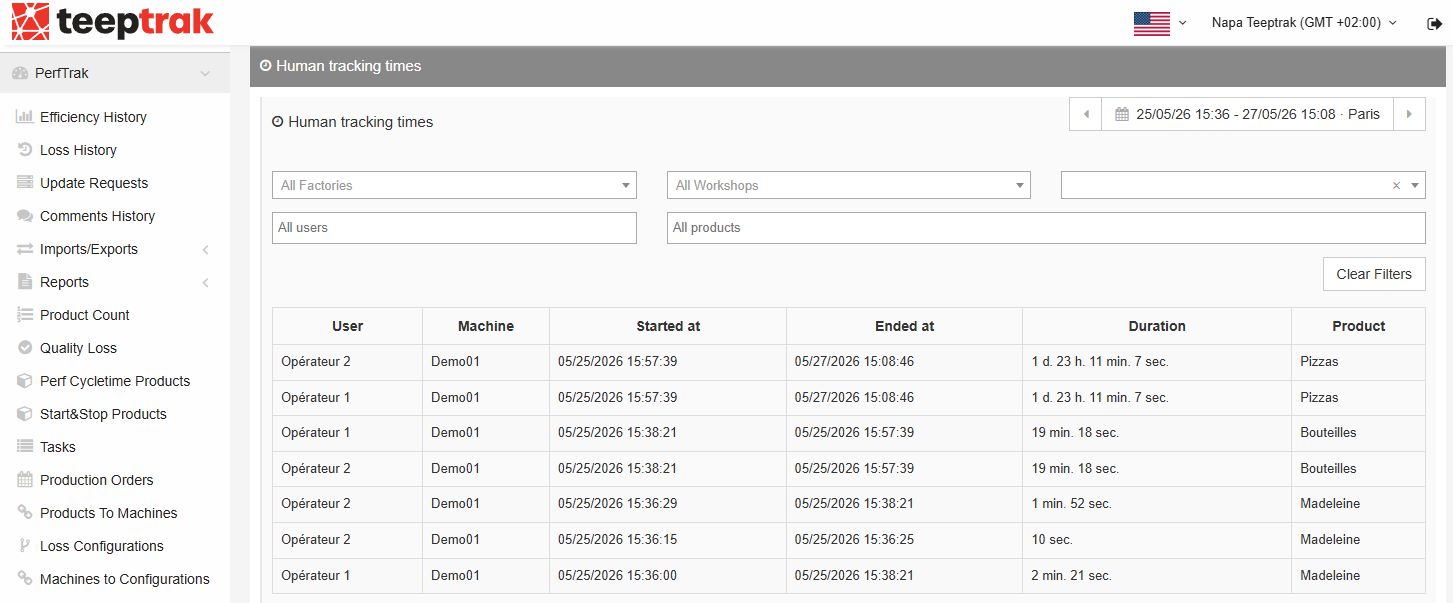
The central table lists all the work periods recorded over the selected period. Each row corresponds to a continuous period of presence of an operator on a machine.
| Column | Description |
|---|---|
| User | The operator — named or generic account — who declared their presence. |
| Machine | The machine the period was recorded on. |
| Started at | Date and time the period started. |
| Ended at | Date and time the period ended. |
| Duration | Total duration of the presence period. |
| Product | Product, or production order, being produced during this period. |
Filters
Several filters refine what the table displays:
- Period: the date range selector at the top right — for example the last 24 hours — which takes the time zone into account.
- All Factories, All Workshops and the machine selector: the scope to display.
- All users: filter by operator.
- All products: filter by product, or by production order when those are used.
The Clear Filters button resets every filter.