Introduction
The Estimated PO completion KPI displays, on your dashboard, when the production order (PO) currently running on a PerfTrak machine should be finished. Depending on your choice, it shows either the estimated end time of the PO or the theoretical remaining time needed to reach the target quantity.
The estimate is based solely on the quantity still to be produced and the product's theoretical cycle time.
Example use cases
Planning the next change-over — A team leader displays the estimated end time of the current PO to prepare the tooling and materials for the next production order at the right moment.
Informing downstream teams — Logistics or quality teams follow the estimated end time on a workshop screen to anticipate picking, packaging or final inspection.
Creating and configuring an Estimated PO completion KPI
Step 1 — Create the KPI
Go to your dashboard.
Click Add New KPI, then select PERFTRAK machine as the machine type and Estimated PO completion as the KPI type.
Step 2 — Configure the KPI
Field | Required | Description |
|---|---|---|
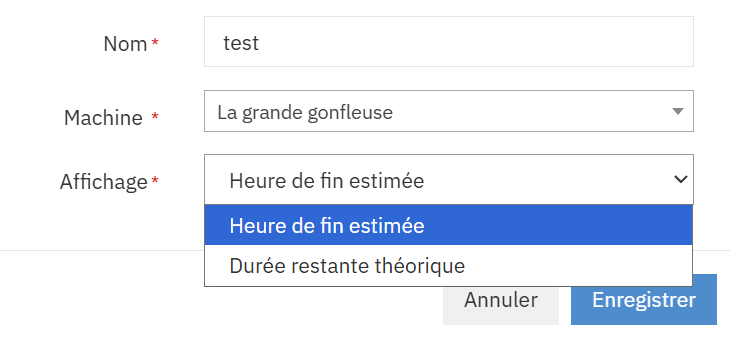
Name | Yes | Free name for the KPI, displayed on the visual (e.g. "End of PO – Press 12") |
Machine | Yes | A PerfTrak machine within your perimeter |
Display | Yes | Information shown by the KPI: Estimated end time or Theoretical remaining time |
The two display modes:
Mode | Description | Example |
|---|---|---|
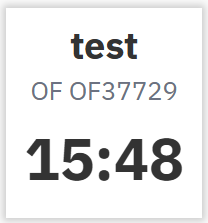
Estimated end time | Time at which the PO should be finished: current time + theoretical remaining time | 15:48 |
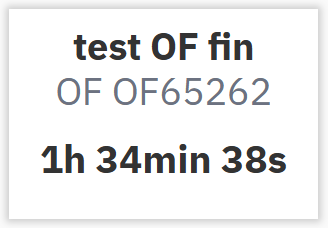
Theoretical remaining time | Time still needed to reach the PO's target quantity, in hours, minutes and seconds | 1h 34min 38s |
Step 3 — Save
Click Save. The KPI appears immediately on your dashboard.
Reading the KPI
The KPI displays the following information:
Line | Description |
|---|---|
KPI name | Title defined during configuration |
Production order | Number of the PO in progress, preceded by "PO" |
Value | Estimated end time or theoretical remaining time, depending on the selected display |
Example in Theoretical remaining time mode:
Calculation method
The calculation period is always the production order currently in progress on the machine.
The KPI determines the quantity still to be produced to reach the PO's target quantity.
This quantity is multiplied by the theoretical cycle time of the product to obtain the theoretical remaining time.
Depending on the selected display, the KPI shows:
this remaining time, or
the estimated end time = current time + theoretical remaining time.
💡 The estimate is purely theoretical: it does not take into account the actual cycle time observed on the machine, nor stops, losses or any past trend. It shows how long the remaining quantity would take if the machine produced at its theoretical rate from now on.
The KPI is refreshed regularly.
Edge cases and points to watch
No PO in progress. If the machine is not producing on a production order at that moment, the KPI is empty.
No target quantity. If the PO in progress has no target quantity, the KPI is empty.
Machine stopped. While the machine is stopped, no pieces are produced, so the remaining quantity — and therefore the theoretical remaining time — stays constant. In "Estimated end time" mode, the displayed time consequently moves forward as time passes.
Theoretical cycle time. The estimate relies on the theoretical cycle time configured on the product. Check that it is set correctly in the product configuration, otherwise the estimate will be wrong.
Machine outside your perimeter. Only the PerfTrak machines included in your perimeter are offered for selection. If a machine is missing, contact your administrator to check your access rights.
FAQ
Why doesn't the estimate take the actual production rate into account? The KPI is deliberately simple and predictable: it shows the theoretical time needed to finish the PO. To follow the actual rate, use the Current Product KPI alongside it.
Why does the end time keep moving forward when the machine is stopped? Because no pieces are produced during the stop, the remaining time does not decrease, while the current time advances. The estimated end time is shifted by the duration of the stop.
Can I display both the end time and the remaining time? Not in the same KPI. Create two Estimated PO completion KPIs on the same machine, one per display mode.