Alarms notify you in real time, by phone or by email, when a machine you are monitoring suffers a critical efficiency loss. They allow every operator, manager or plant director to react quickly.
Alarms Configuration
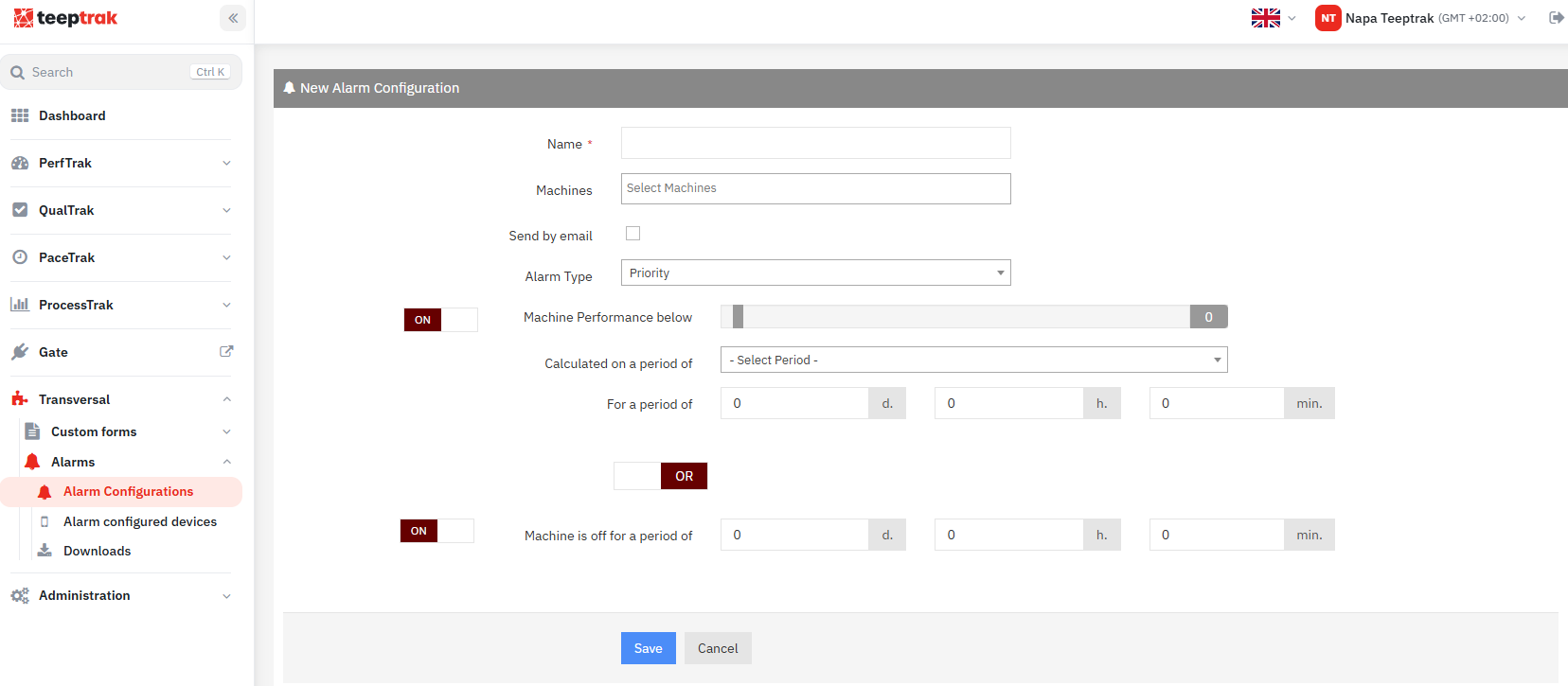
Go to Transversal > Alarms, then click Alarm Configuration and Add New.
Fill in:
the name of the alarm;
the machine or machines monitored;
the alarm type (Priority, Level 1 or Level 2);
the trigger condition or conditions.
Trigger conditions
Machine performance below
The alarm is triggered when the performance, calculated over a given period, stays below a threshold for longer than a defined duration.
Example: "Notify me if the performance is below 80% over the rolling hour for more than 10 minutes."
Machine is off for a period of
The alarm is triggered when a machine has been stopped for longer than the defined duration. This condition is useful, for example, to speed up the maintenance intervention.
Alarm types
The type is used to classify alarms by level of urgency:
Priority: received on the phone 24 hours a day, 7 days a week.
Level 1 and Level 2: received only during the time slots defined in the mobile application.
Receiving alerts
Once the alarm has been created on the web platform, pair a phone and/or add an email address.
To receive alerts on a phone, two options are available:
"TEEPTRAK Alarm" application: download it from Google Play or the App Store, then log in with your TeepTrak credentials.
SMS: paid service, activated on request only.
User accounts
Each user created by the administrator can create their own alarms from their web interface, then pair their phone using the same credentials.
If several people need to follow the same alarms, create a shared Manager or Operator account. Do not use the administrator account or a personal account: this avoids sharing passwords.