A noisy module can emit several dozen pulses per second. Each link in the chain progresses at its own pace: when more pulses arrive than leave, a queue fills up. This page describes where those queues are, their known limits, and the protection mechanism implemented by the application.
Key figures
Value | What it refers to |
|---|---|
1 at a time | pulses processed by the tablet, one queue per machine |
100 / 20 s | default synchronisation to the platform, i.e. 5 items/s at most |
15,000 | pending tasks on the tablet: Bluetooth is cut |
500 | remaining tasks: the module is reconnected |
The chain, link by link
Three reservoirs follow one another. Each absorbs the surges, as long as the incoming rate does not durably exceed the outgoing rate.
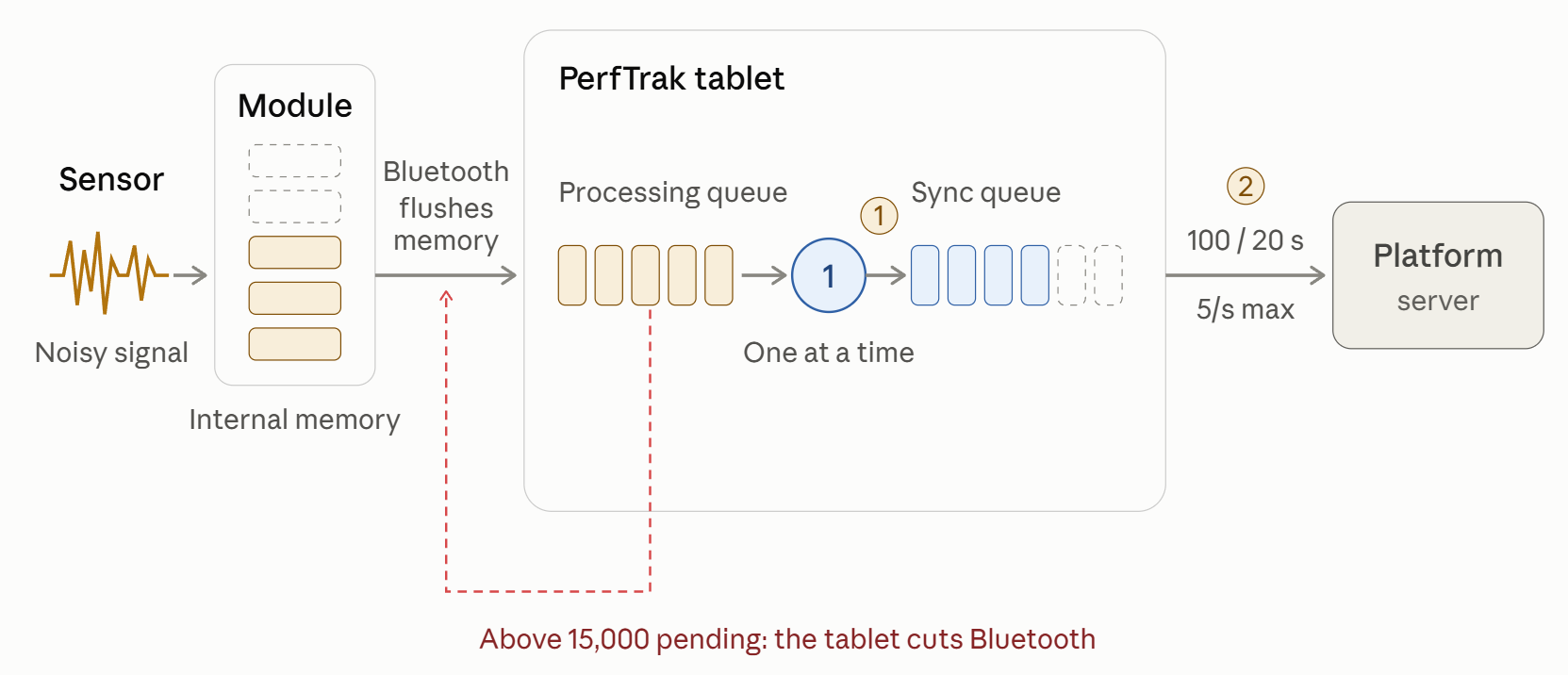
Stored pulses (in orange) are waiting to be processed; the blue items are waiting to be sent. The red arrow represents the protection mechanism described below. Badges 1 and 2 identify the two known bottlenecks.
Module memory
The module records every pulse with its timestamp. While connected, it transmits the pulse to the tablet. While disconnected, it retains the pulse and flushes its memory as soon as it reconnects. It acts as a buffer, not as a bottleneck.
1. Processing on the tablet
Each pulse is written to the database, then processed to build the perflogs, one at a time per machine. The throughput depends on the tablet and its load: it is not a fixed value.
2. Synchronisation to the platform
A batch of 100 items every 20 s, i.e. 5 per second at most.
When the noise exceeds the synchronisation capacity
With the default settings, the synchronisation transmits at most 5 items per second. Anything arriving beyond that threshold adds to the platform's backlog, hour after hour, even if the tablet is able to process the flow.
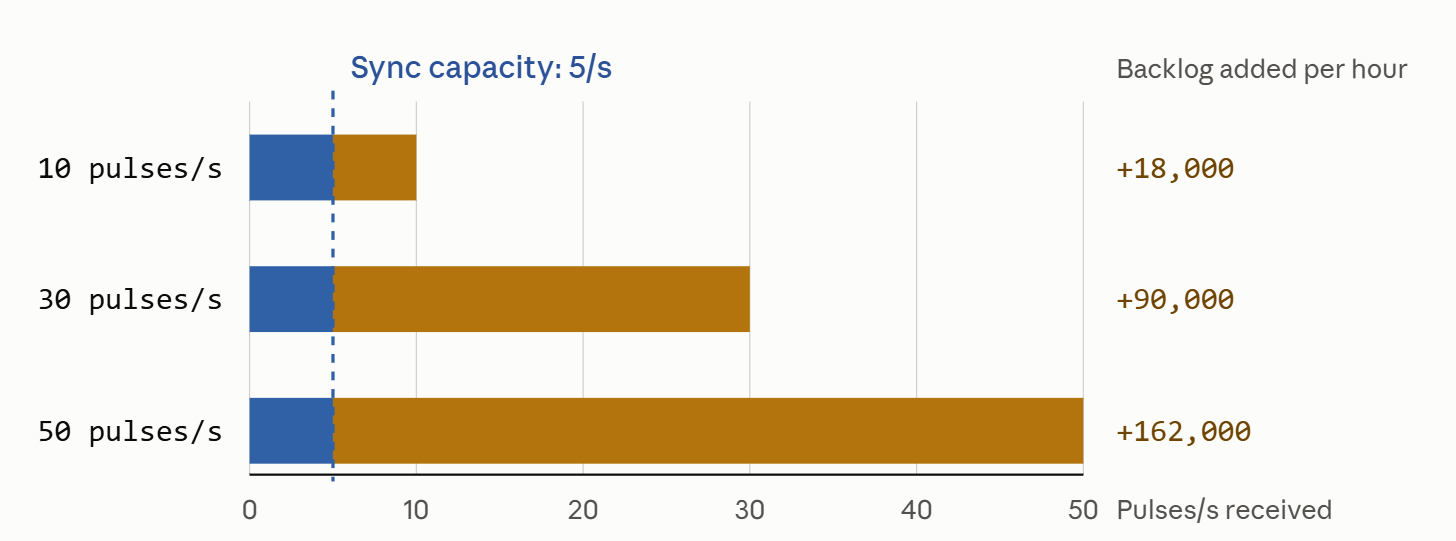
In blue, the volume transmitted as it comes; in orange, the volume accumulating in the synchronisation queue. These values are orders of magnitude, established on the basis of one item to synchronise per pulse. The backlog only clears once the flow falls back below 5 pulses per second; increasing the batch size or shortening the delay raises that ceiling.
The protection mechanism: temporary disconnection
When the tablet is no longer able to keep up with the flow, its processing queue lengthens. To avoid saturation, the application cuts Bluetooth and lets the module handle storage in its place, long enough to clear the backlog.
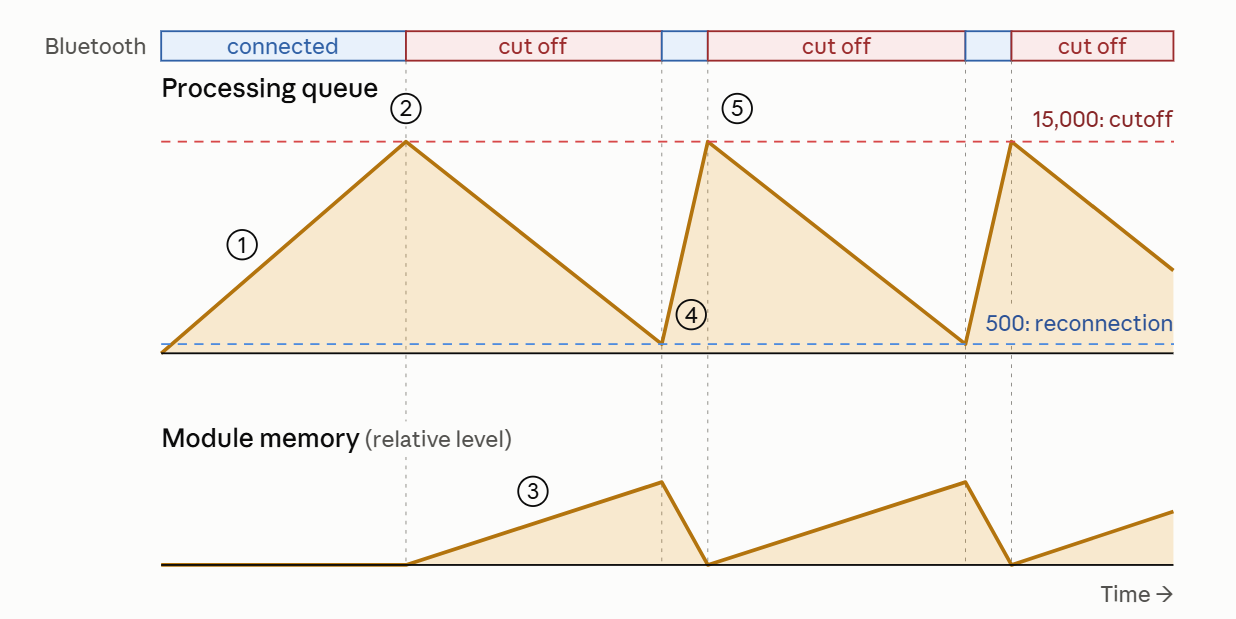
Illustration established with uninterrupted noise; the time scale is indicative. The vertical scale of the queue is respected, which is why the 500 threshold appears close to zero. The noise fills the queue faster than the tablet empties it.
At 15,000 pending tasks, across all the machines of the tablet, the application disconnects every module.
The module continues counting and retains the pulses in its memory.
When the queue falls back to 500, the application reconnects and the module flushes its memory in one go.
If the noise persists, that burst brings the queue back to 15,000 and a new cycle begins.
💡 Two distant thresholds are used rather than a single one, so that the application does not alternate between cut-offs and reconnections over a handful of tasks.
Four scenarios
From the mildest case to the most critical, depending on the noise rate and its duration.
Scenario | Condition | Tablet | Platform | Bluetooth |
|---|---|---|---|---|
Noise absorbed | under 5 pulses/s | up to date | up to date | connected |
Platform behind | over 5 pulses/s, the tablet keeps up with the flow | up to date | behind | connected |
Tablet saturated, one-off noise | more pulses than the tablet can process | behind | behind | cut temporarily |
Tablet saturated, continuous noise | the noise does not stop | growing backlog | growing backlog | repeated cut-offs |
Noise absorbed — No visible effect. The queues drain as they fill.
Platform behind — The tablet remains in real time. The platform's data falls behind, and the backlog clears once the noise subsides.
Tablet saturated, one-off noise — The machine is no longer in real time: actions that require it, such as a product change, are refused. Where applicable, cut-off at 15,000 then reconnection at 500. The situation then returns to normal.
Tablet saturated, continuous noise — Each reconnection causes a new saturation. The application does not clear its backlog as long as the source of the noise is not dealt with.
Avoiding the scenario
Two families of measures exist, depending on whether the noise is suffered or controlled.
Cut it at the source
The noise never enters the module's memory.
Power off the module

The module no longer records any pulse, and the tablet considers it disconnected until it is powered back on.
Unplug the sensor

The module remains powered and connected, but the noise no longer reaches it: no pulse is recorded.
Have the application ignore the pulses
This solution applies to controlled noise, over a known duration. The module continues to transmit, but the tablet discards the pulses on arrival: they are neither recorded, nor processed, nor synchronised.
Start a task

A cleaning task, for instance: the time is qualified and the pulses are ignored until the task ends. Starting it may require real time; the task must therefore be started before the noise appears, and not during the saturation.
Ignore the pulses

The "Ignore the module's pulses" option: a slider button on the main screen. Listening must be re-enabled once the operation is complete.
⚠️ In every case, real production is not counted during this period: the nominal configuration must be restored before production resumes. Cutting Bluetooth or closing the application has no effect, as the module continues to record the noise and hands it over on reconnection.
What the user sees
What is displayed | When | Content |
|---|---|---|
Action refused | the processing queue is not empty | "Requires real time — Pulses waiting to be processed: N" |
Action refused | the module is flushing its memory after a reconnection | "Requires real time — Retrieving data from the module" |
Alert window | during the cut-off; closes automatically on reconnection | "Many messages were received from the module. The application has temporarily disconnected to process these messages and will reconnect afterwards." |
Green-and-orange Bluetooth icon | during the cut-off; tapping the icon shows | "Many pulses to process, temporarily disconnected from the module" |
Key takeaways
The cut-off does not cause any pulse loss, within the limits of the module's memory: the module retains them, and the tablet writes them to the database before processing them.
Timestamps come from the module: the perflogs remain accurate in time. Only the display and the platform show a delay.
The 15,000 threshold is shared across the whole tablet and the cut-off applies to all of its modules: one noisy machine penalises the other machines on the same tablet.
The remedy lies at the source of the noise. Adjusting the synchronisation speeds up the platform, but not the tablet.