Quality sessions on the tablet
An explanatory video is available here.
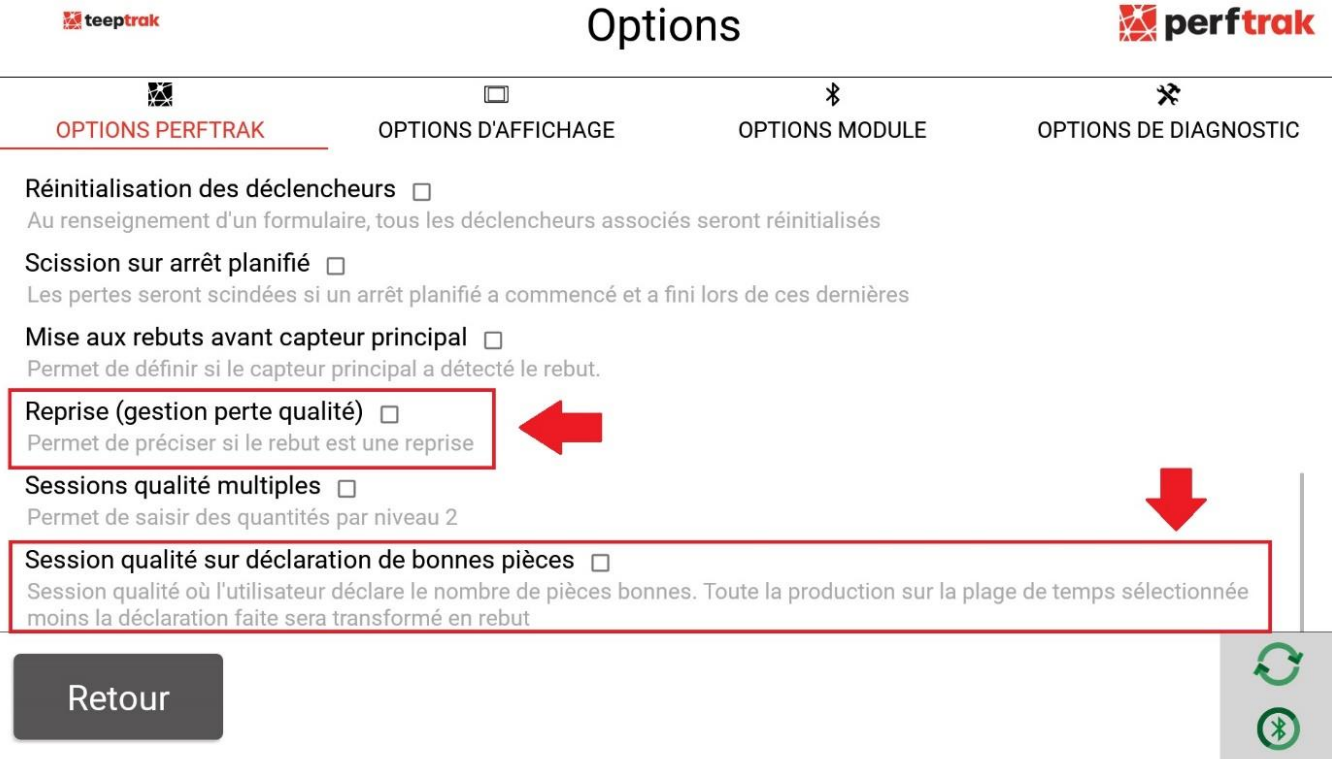
Step 1: Enable the options
In the tablet settings (cogwheel icon > Options), tick:
Rework (quality loss management)
Quality session on good parts declaration
Step 2: Start a quality session
From the main screen, open the Tools tab > Quality loss management.
The available modes are: live, past production, good parts, next pulse, next product.
Select the period: Last hour / Current shift / Today / Last 24h / Last 7 days. You can set it automatically in Settings > PerfTrak Options > Quality Session - Default period.
Select the product.
Enter the quantity to scrap.
Select the level 1 and level 2 losses of the loss group.
Add a comment if necessary.
Check the summary, then tap "Transform".
The operation is confirmed by the message "Operation completed successfully".