1. Introduction
The Product Change feature lets you modify, from the platform, the product or the production order that was run over a given period.
Typical use case:
An input or product-change error occurred during production: the product or production order (PO) selected on the tablet does not match the one actually being manufactured. From the platform, a manager can change the product over the problematic period. Once the correction is made, the data associated with the affected period is automatically recalculated according to the characteristics of the new product or PO.
2. On the platform
⚠️ Important: product/PO changes can only be made for periods shorter than one day.
Go to PerfTrak > Product Change and click Add new.
Then fill in the following fields, in order:
- Machine name,
- Time range and time zone,
- Original product (the wrong product/PO),
- Target product (the new product/PO),
- Comment (optional).
After validation and confirmation, the change request appears in the table. All the parameters are recalled there, along with the status of the request. The change is not instantaneous — it can take a little time.
Changes are also visible in the Update Requests tab, with more detail on the status of the request and any error messages.
Note
- Target products/POs must be assigned to the tablet for the change to work.
- Pulses are always modified in full. When a product has a multiplier coefficient (one pulse corresponds to n products), the n products of a pulse cannot be partially modified: either all of them are changed, or none.
- It is not possible to change a product into a PO, or a PO into a product.
Error messages
A product change can fail for several reasons. A specific error message is then displayed in Update Requests:
The requested range requires real time.— The requested range needs real-time data that is not yet available on the tablet. Check the module and tablet connection, and wait.The requested range does not overlap the performance logs.— Part of the data for the requested period is unavailable on the tablet. Consider a narrower period, whose data is either entirely on the tablet or entirely on the platform.Quality data exists in the requested range.— Quality data exists over the requested range. You need to delete the quality sessions for that period manually before performing a product change. You can then recreate the quality sessions manually on the new product.Reference currently selected on the tablet.— The reference of the target PO or of the original PO is currently selected on the tablet. A PO being produced cannot be modified, to avoid data conflicts. Wait until that PO is no longer in production.The reference does not exist on the tablet.— The reference does not exist on the tablet. Reassign it to the tablet to be able to perform the requested change.No eligible period was found.— No pulse with the original product or PO was recorded over this period. You can extend the period until it includes at least one pulse of the original product; note that, by definition, a pure downtime period contains no pulse.
3. Example
Product 1 was selected instead of Product 2, but their parameters differ:
- Product 1: cycle time 8 s / triggering cycle time 10 s
- Product 2: cycle time 4 s / triggering cycle time 5 s
Actual production timeline:
- 10:00 – 10:50 = Product 3
- 10:50 – 11:00 = Product 1 (instead of Product 2)
- 11:00 – = Product 2
We therefore perform a product change on the platform:
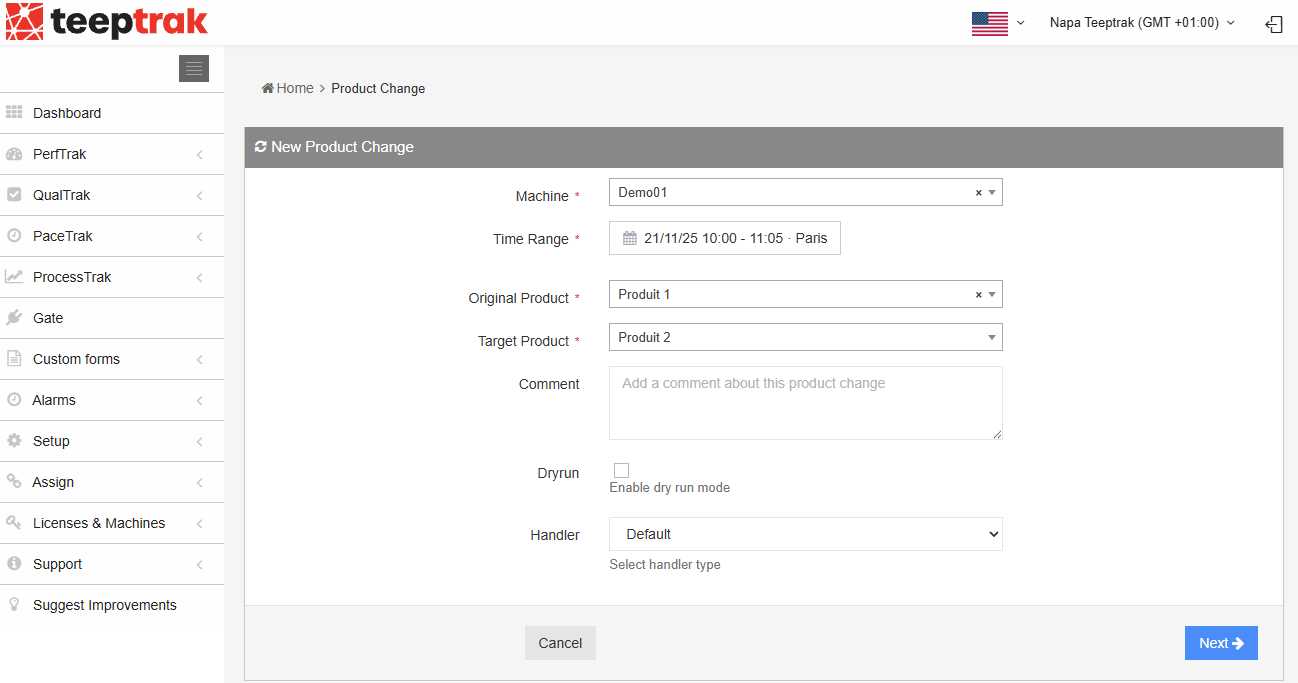
Note: even if the selected time range is broader, the system only modifies the period that actually corresponds to the Original product, replacing it with the Target product.
In this example, even though the selection starts at 10:00, Product 3 (produced between 10:00 and 10:50) is not modified.
Once the change is confirmed, the tablet displays the message "Product recast in progress…". This message stays visible for a few seconds, while the data update is applied.

The data update then takes effect on:
- the Loss History,
- the dashboard KPIs,
- the product count on both the platform and the tablet,
- the Update Requests and loss history.
Chronograph example
Before the change:
A high level of overclock duration can be seen, because the cycle time does not match the selected product.

After the change:
The overclock duration is converted into normal time, since the correct product has been restored and now matches the cycle time recorded over that period.

Product count example on the tablet
Before:
The number of products counted on the platform is much higher than the expected number.

After:
Product 1 has completely disappeared from the product count, and the count for Product 2 is consistent again with the expected value displayed.
