Introduction
In standard mode, the planned shutdown is only detected if the machine stoppage is continuous over the whole period. It is the strictest mode.
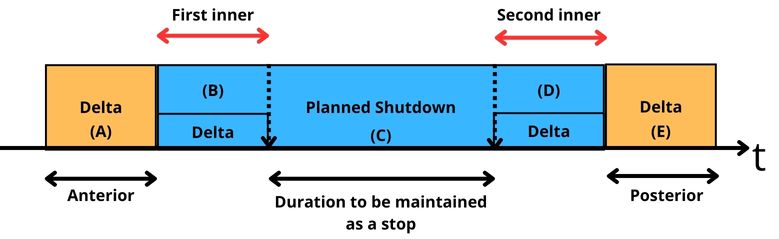
Detection rule: any loss starting before or during the 1st delta (inner or outer), and ending during or after the 2nd delta (inner or outer), is compatible with the detection of the planned shutdown. Any loss starting and/or ending within the planned shutdown interval is not considered.
⚠️ Activating the "Stop Production" button or launching a "task" deactivates the detection of planned shutdowns. Do not use these options if you want to use the feature in standard mode — see the case studies at the end of this article.
Qualifying durations with a continuous stop
If the downtime includes and exceeds the duration of the planned shutdown, the application splits the time into three distinct segments: anterior delta → planned shutdown → posterior delta.

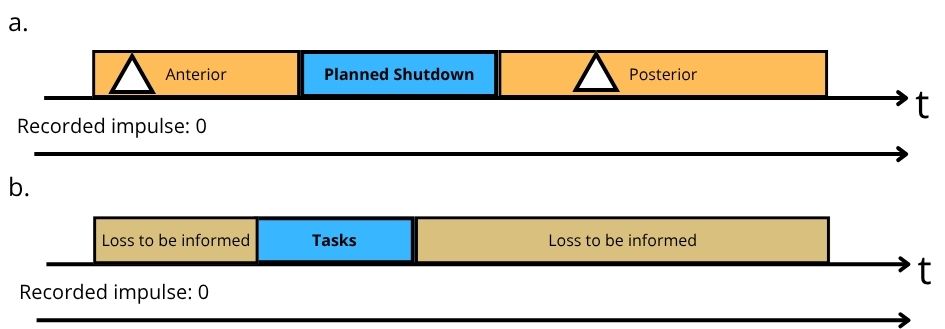
The orange rectangles represent the losses — automatically informed under the delta heading — and the white triangle indicates that they occurred during the planned shutdown deltas. The blue rectangle represents the planned shutdown and its associated loss. The top arrow represents the timeline, with a stop lasting for its whole duration; the bottom arrow represents the signal level, flat at 0V.
Case studies
Impulses during the deltas
The deltas play their tolerance role: if one or more impulses occur during their duration, the detection of the planned shutdown is not invalidated, since the condition of a continuous stop before and after the planned shutdown remains satisfied. An impulse during the planned shutdown itself, however, ends the detection.
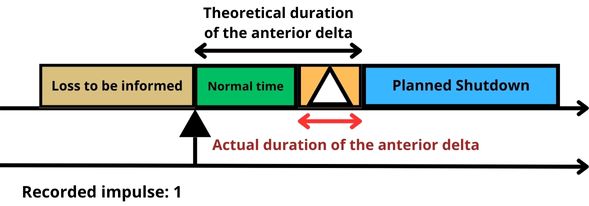
Impulse during the 1st delta
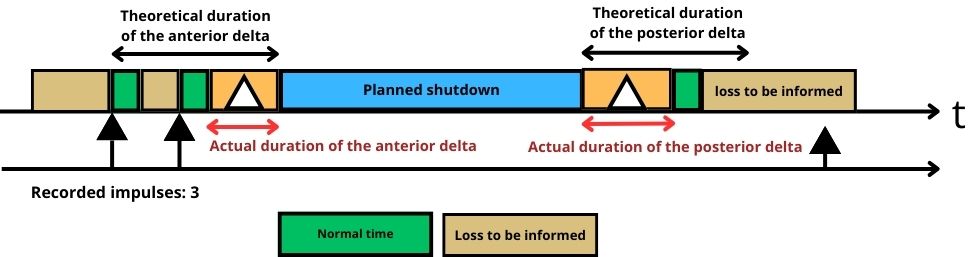
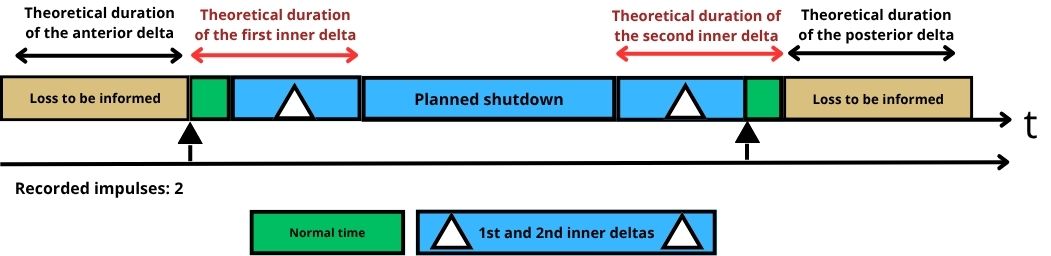
An impulse during the 1st delta splits the ongoing duration: the first part of the stop, before the impulse, has to be informed by the operator. The remaining time is displayed as "normal time", equal to the theoretical cycle time. If no other impulse occurs, the duration between the start of the last recorded loss and the start of the planned shutdown is automatically informed under the delta heading.
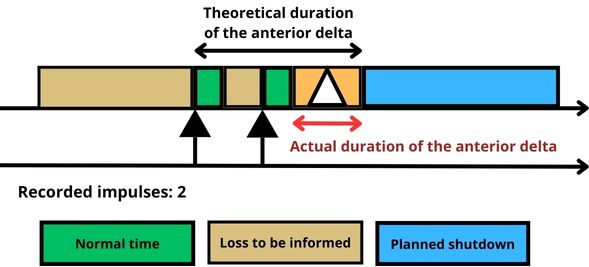
When several impulses occur, only the duration of the last loss before the planned shutdown — between the end of the normal time and the start of the planned shutdown — is qualified as a delta. The previous stoppages still have to be informed.
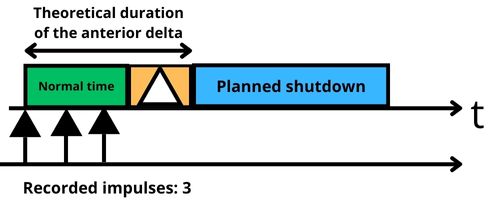
If the impulses follow one another without generating a loss, before a stop occurring between the normal time and the start of the planned shutdown, that duration then corresponds to the delta, and the time is informed in the sequence: normal time → delta → planned shutdown.
Impulse during the 2nd delta
An impulse during the 2nd delta has no consequence on the 1st delta nor on the planned shutdown. The second delta ends when the impulse appears: its actual duration is the time between the end of the planned shutdown and the first impulse.
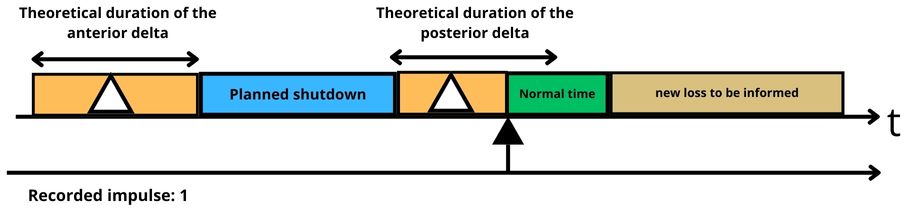
After the impulse, normal time appears, equal to the theoretical cycle time. If no other impulse follows, a loss to be informed appears and the classic stoppage tracking resumes, ending the planned shutdown qualification mechanism.
In short, the anterior and posterior deltas are detected and informed as such if a stop is detected during their configured duration. Their actual duration depends on when the impulses occur: it is therefore often shorter than the configured theoretical duration.
Impulse during the first inner delta
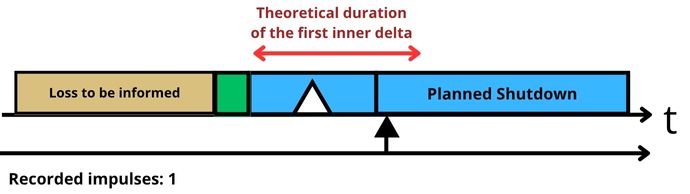
The same logic as for the anterior delta: the left part of the loss has to be informed — it is separated from the planned shutdown by normal time — while the right part is qualified automatically, being adjacent to the planned shutdown. The only difference: the inner delta is never informed under the delta heading, but directly under the loss heading of the planned shutdown.
Impulse during the second inner delta
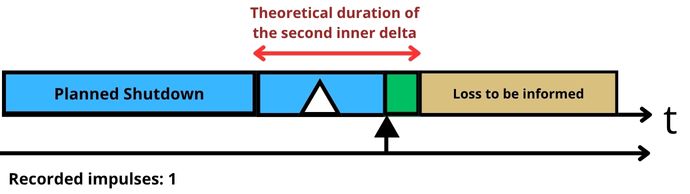
Similar logic to the posterior delta: the left part is informed automatically — adjacent to the planned shutdown, under the planned shutdown heading — while the right part has to be informed, being separated from the planned shutdown by normal time.
Impulse during the planned shutdown
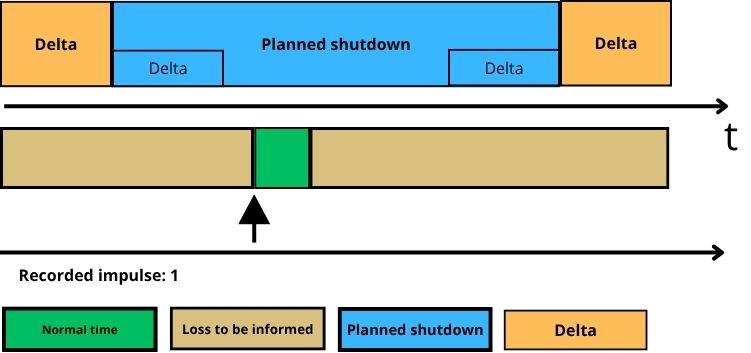
An impulse during the planned shutdown — outside the deltas — puts an end to the planned shutdown and to all the durations that were to be informed, the deltas in particular, and splits the ongoing stop: the left side, the past, shows a loss to be informed since the last detected impulse; the right side shows normal time equal to the theoretical cycle time, followed by a loss to be informed if no other impulse follows.
Splitting a pending loss
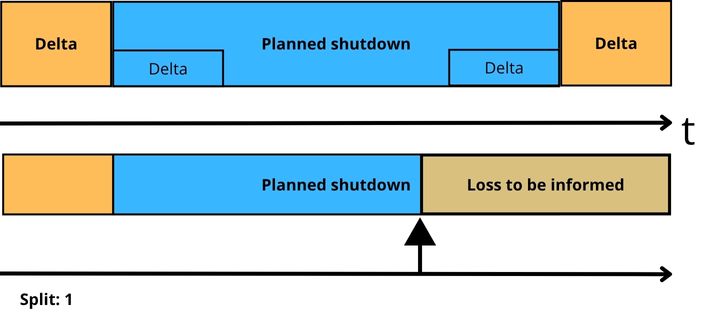
When the planned shutdown is split, the left side — the past — keeps the heading chosen for the planned shutdown, and the remaining time has to be informed by the operator. Splitting automatically deactivates the qualification of the future durations that had previously been allocated to the planned shutdown: a new pending loss, with no predefined heading, has to be informed.
The "Stop Production" button
In standard mode, activating the "Stop Production" button prevents the planned shutdown feature from being applied: the heading chosen for the production stoppage is displayed instead of those of the deltas and of the planned shutdown.
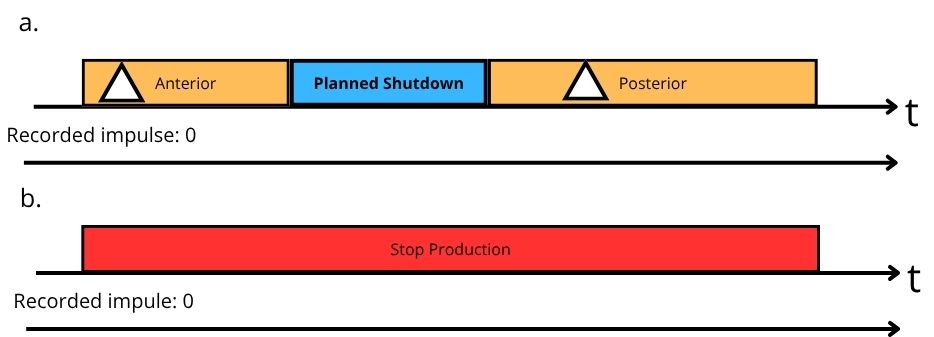
Diagram a: no impulse over the period (0V), without the "Stop Production" button — the application qualifies the data according to the delta and planned shutdown headings. Diagram b: same conditions, with the "Stop Production" button activated during the period.
Launching a task
In standard mode, launching a task also prevents the planned shutdown feature: the task heading is displayed for as long as the task lasts. If the task does not cover the whole period (deltas + planned shutdown), a loss to be informed follows the task, with classic time tracking. Non-production times before and after the task are considered as losses to be informed.
Start & Stop: in the Start & Stop version, the trigger is a status change (rising edge) rather than an impulse, and the normal time corresponds to the non impactful threshold rather than to the theoretical cycle time.
FAQ
Why was my planned shutdown not detected?
In standard mode, an impulse during the planned shutdown itself, the use of the "Stop Production" button or launching a task all end the detection.
Does an impulse during a delta cancel the planned shutdown?
No: that is precisely what the deltas are for. Only impulses during the planned shutdown itself, outside the inner deltas, cancel the detection.