Introduction
The "Listen events" mode takes into account all the impulses generated over the period, without invalidating the detection of the planned shutdown. The deltas are qualified automatically under their heading, and the impulses generate normal time within the period.
How it works
The application segments the time at each splitting point — the start boundaries of the deltas and of the planned shutdown:
- At each split, the left side keeps its existing information.
- The right side is updated with normal time — equal to the number of impulses multiplied by the cycle time of the current product — followed by the stoppage cause of the segment being processed.
This works in the same way as losses are currently handled in the application: when a user splits a loss, the right side loses its existing information. The difference is that the system immediately applies the correct qualification to the right side after each split.
Operational behaviour during the period:
- Every duration recorded at 0V is automatically informed as "planned shutdown" and/or "planned shutdown delta" — anterior or posterior delta.
- Any impulse recorded during the planned shutdown turns the available duration into normal time. The sum of the impulses multiplied by their theoretical cycle time equals the total normal time over the period.
Example: if, during the planned shutdown, a product with a theoretical cycle time of 5 seconds is recorded 5 times, the normal time is 5 × 5 = 25 seconds — the classic way normal time is calculated.

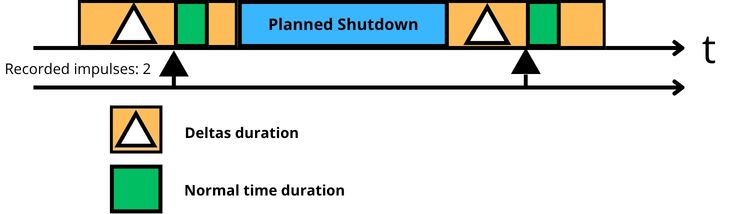
Green stands for normal time and the black arrows for the impulses — one arrow = 1 impulse. The planned shutdown is not invalidated, but shares its duration with the normal time generated by the impulses.
Start & Stop: the system takes rising edges (status changes) into account rather than impulses, and the normal time corresponds to the sum of the non impactful stoppage durations rather than to the number of impulses × cycle time.
Case studies
Impulse during the 1st or the 2nd delta
If an impulse occurs during the 1st delta, it is taken into account and followed by normal time, equal to the cycle time of the last product being produced. If no other impulse occurs during the delta, the detected loss is automatically qualified under the delta heading.
The logic is the same for the second delta: an impulse splits the ongoing duration, qualifying as normal time the cycle time that follows the impulse.
Impulse beyond the 2nd delta
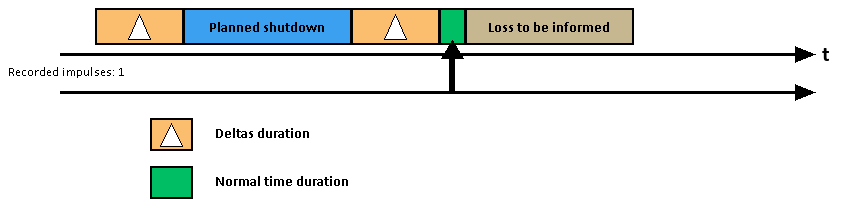
An impulse beyond the 2nd delta is taken into account and ends the qualification of the posterior delta. It produces normal time, equal to the theoretical cycle time, followed by a loss to be informed.
The "Stop Production" button
Manual action by the operator is considered to take priority. The deltas, being transitive and automatic, give way to the production stoppage heading. The qualification of the planned shutdown, however, prevails, because the shutdown is planned and non-transitive.
Prerequisite: to activate a "Stop Production", a stoppage must be ongoing and no impulse must occur at the moment of activation.
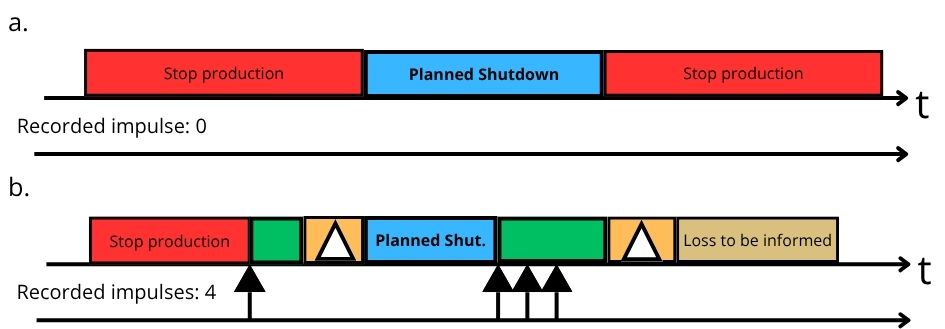
Diagram a: button activated before the first delta, no impulse over the period — the deltas are "covered" by the production stoppage. Diagram b: a first impulse occurs during the stoppage, then others during the planned shutdown and the second delta — receiving an impulse during the first delta or the planned shutdown deactivates the automatic qualification of the second delta and leaves a loss to be informed.
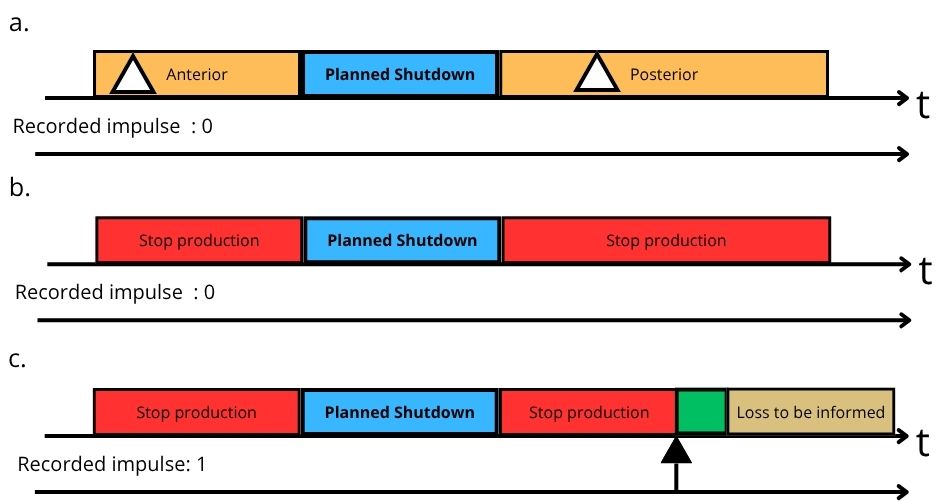
Diagram a: the planned shutdown as configured on the platform. Diagram b: the operator activates the production stoppage — with no impulse, the deltas are informed under the production stoppage heading. Diagram c: an impulse splits the duration qualified as a production stoppage, at the end of the second delta, and displays on the right a loss to be informed after the normal time.
Launching a task
Generally speaking, the task takes over the planning, and the remaining time is qualified by the headings of the deltas and of the planned shutdown — in every mode except standard. Impulses occurring during a task are ignored, even in "Listen events" mode.
Launching a task therefore does not prevent the planned shutdown feature: the task heading is displayed for as long as the task lasts, and if it does not cover the whole period (deltas + planned shutdown), the headings of the deltas and of the planned shutdown inform the remaining period. The automatic information runs in the background, behind the tasks and the normal time generated by the impulses.
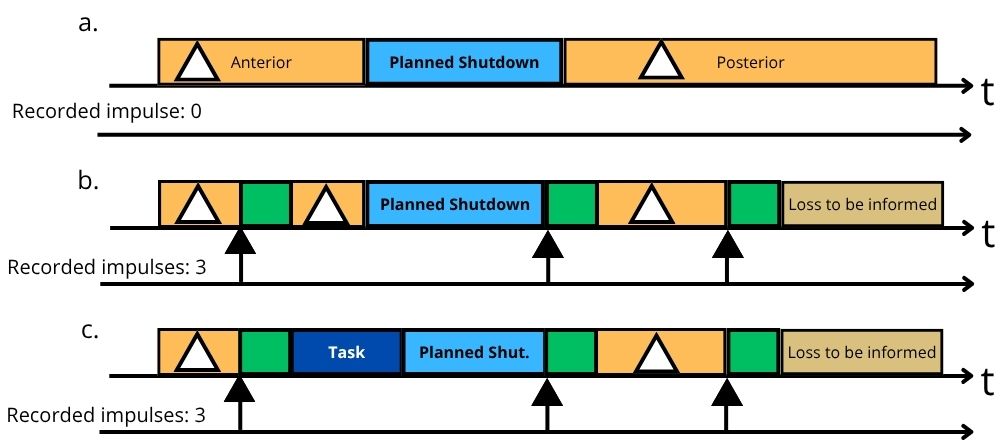
Diagram a: no impulse, no task — qualification according to the delta and planned shutdown headings. Diagram b: impulses present, no task — the durations are split with normal time added, in green. Diagram c: impulses present and a task launched at the end of the 1st delta — the task duration is qualified under its own heading, without affecting the rest of the informed durations.
FAQ
Is the planned shutdown cancelled if the machine produces during the period?
No: production generates normal time within the period, but the detection of the planned shutdown and of the deltas is maintained.
How do I disable the automatic information of the posterior delta?
Untick the "Allow after delta auto information" option — see the article "Configuring a planned shutdown step by step". The posterior delta then has to be informed by the operator.