Available since the update of 24 July 2026.
On PaceTrak, the operator could already enter the quantity produced manually at the end of a simple routing. This is now extended to complex routings: at the end of the routing, the operator enters the quantity actually produced, in the unit defined by the Manager.
Because a given complex routing (sequence and duration of the subtasks) can produce varying quantities, this feature guarantees reliable tracking of the actual volumes. The quantity entered is taken into account in all the PaceTrak calculations involving the product count: KPIs, reports and exports.
1. Entering the quantity produced (Operator)
At the end of the complex routing, if manual entry is enabled, the operator is systematically prompted to enter the quantity produced, on a dedicated screen of the tablet.
The unit displayed corresponds to the "Grouping name" defined by the Manager.
Example: the grouping name is "Litres" and the operator has produced 1,200 litres — they enter "1200" and confirm.
If manual entry is disabled, the quantity produced is saved automatically from the grouping coefficient, without any action from the operator.
2. Editing a quantity that has been entered
- On the tablet — the operator can edit the quantity produced from the history, as long as the data is still available locally.
- On the platform — the Manager can edit the quantity produced at any time.
The corrected quantity is reflected in all the calculations.
3. Configuration (Manager)
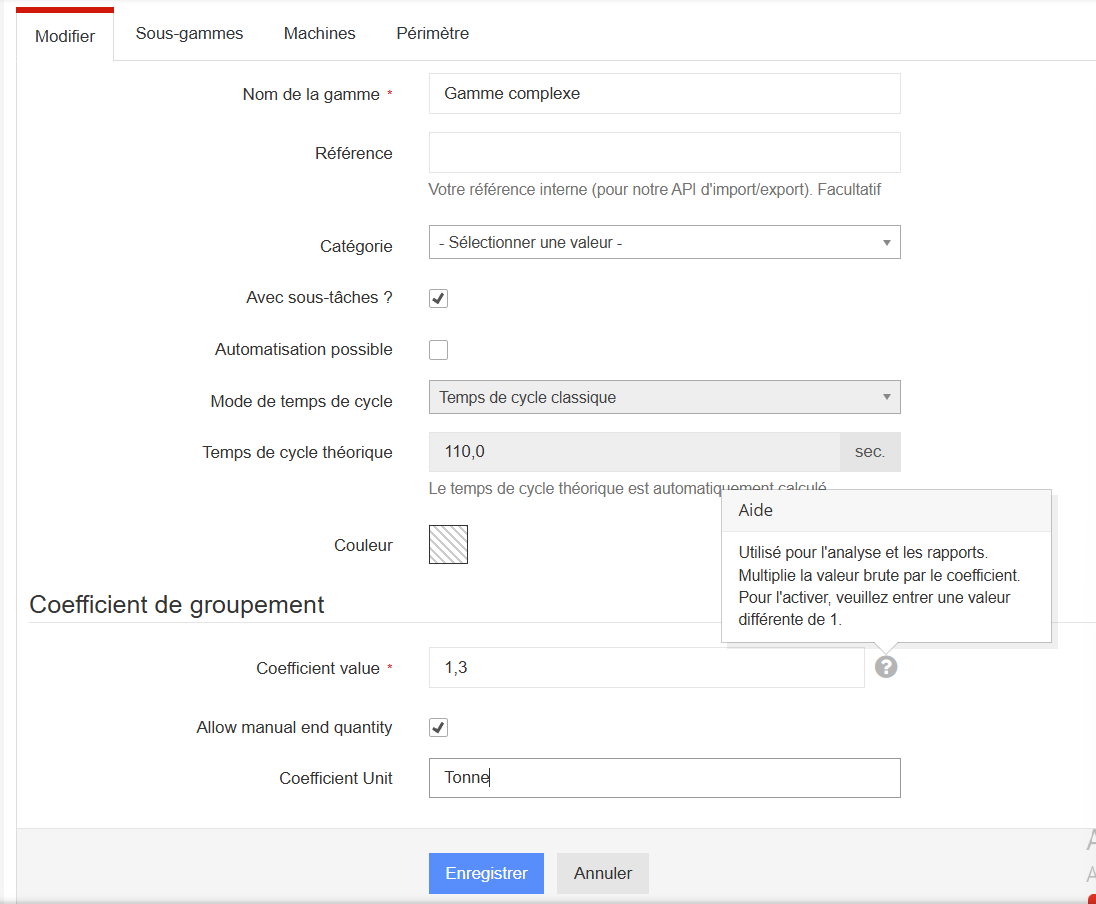
Enabling manual entry, the unit of entry and the grouping coefficient are configured on the platform, in the complex routing's record. See the Routings article of the Platform section for the details.
4. Points to bear in mind
- No partial entry per subtask — the quantity is entered globally at the end of the routing.
- Only one calculation method per complex routing: manual entry or grouping coefficient.
- Rights — the configuration is reserved for the Manager; the operator can only enter and correct the quantity.